> For the complete documentation index, see [llms.txt](https://docs.gap.karmahq.xyz/llms.txt). Markdown versions of documentation pages are available by appending `.md` to page URLs; this page is available as [Markdown](https://docs.gap.karmahq.xyz/how-to-guides/for-grant-managers/impact-measurement.md).
# Impact Measurement
Karma’s impact measurement system helps program operators define, collect, and analyze the outputs and outcomes of funded projects using standardized and custom indicators.
Karma includes built-in impact measurement features that help **program operators** and **grantees** track, verify, and communicate the real-world impact of funded projects.
The system is inspired by the **Common Impact Data Standard (**[**CIDS**](https://www.commonapproach.org/common-impact-data-standard)**)**, a widely used framework for structuring impact around **outputs**, **outcomes**, and **indicators**.\
Karma adapts these ideas into a **practical, onchain-native workflow** suitable for web3 programs.
### Core Concepts
Before configuring impact measurement, it’s important to understand the core concepts used in Karma.
#### Activities
**Activities** describe what was *directly produced* by a project using the funding it received.
Examples:
* Code written
* Features shipped
* Research completed
* Events organized
Activities answer the question:
> *“What did the grantee actually do?”*
***
#### Outcomes
**Outcomes** describe the *change or effect* that resulted from those outputs.
Examples:
* Increased network usage
* Improved developer adoption
* Economic growth
* Environmental or social change
Outcomes answer the question:
> *“Why did those outputs matter?”*
***
#### Indicators
In Karma, the **metrics used to measure outputs and outcomes are called Indicators**.
Indicators can be:
* **Predefined** (automatically tracked by Karma)
* **Custom** (manually reported by grantees)
Indicators make impact measurable, comparable, and verifiable.
***
### Example: Activities, Outcomes, and Indicators
Imagine you fund a project to build an onchain application.
**Activity**\
Developer activity in your ecosystem
**Activity Indicators**
* GitHub commits
* Pull requests merged
**Outcome**\
Increased economic activity in the network
**Outcome Indicators**
* Number of transactions
* Total Value Locked (TVL)
This separation allows you to clearly see:
* What work was done (outputs)
* What change that work created (outcomes)
### Step-by-Step: Setting Up Impact Measurement
#### Step 1: Categorize Funded Projects
Programs often fund **many different types of projects**, and impact indicators are rarely one-size-fits-all.\
The first step is to categorize your projects.
**How to do this**
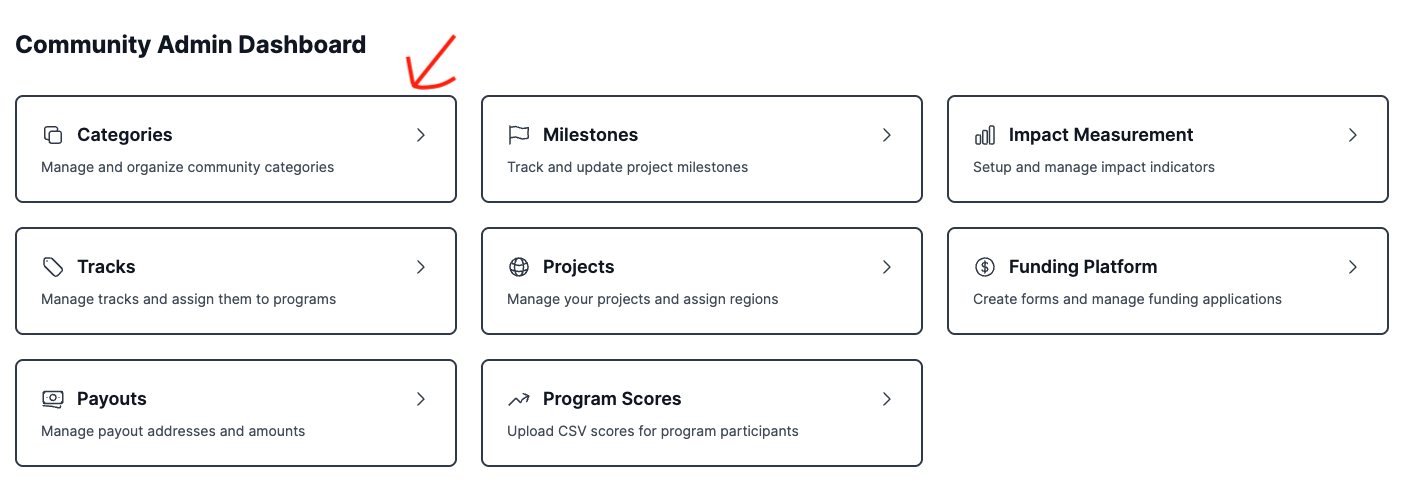
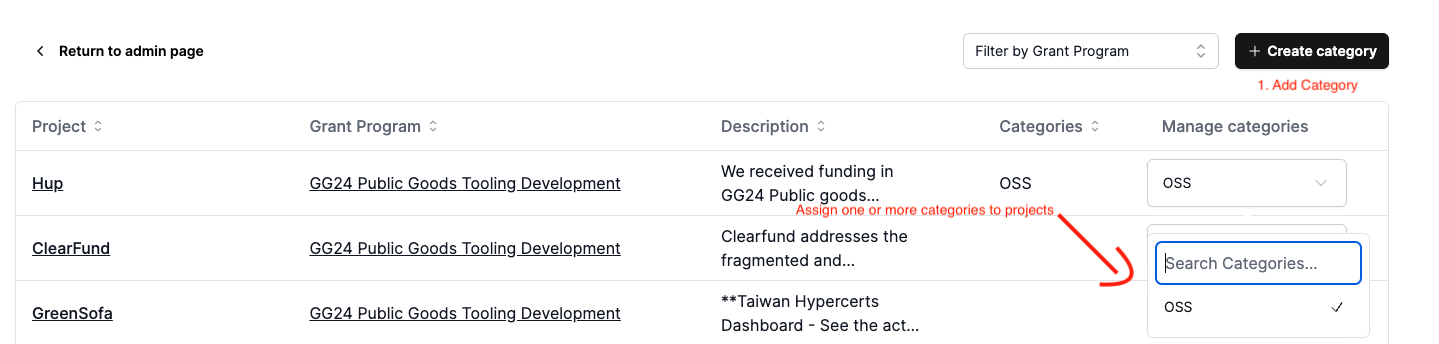
1. Go to **Categories** in your admin dashboard
2. Click **Add Category and** add one or more categories (e.g. *Developer Tools*, *Infrastructure*, *Community*, *Research*)
3. Assign one or more categories to each funded project
> Categories determine which outputs, outcomes, and indicators are available later.
#### Step 2: Define Activities, Outcomes, and Indicators
Once categories are set up, you can define how impact is measured for each category.
**How to do this**
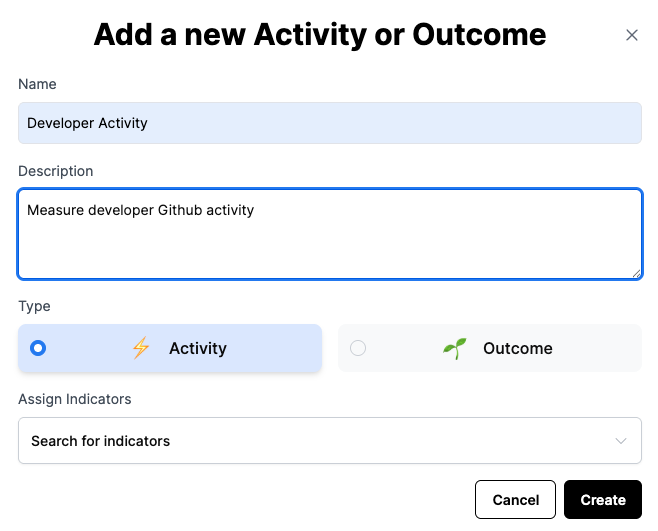
1. Go to **Impact Measurement** page from admin dashboard
2. Select a **Category**
3. Add **Activities by clicking on Create Activity/Outcome button**
4. Choose a name and description (this will be displayed on impact dashboard on your community page)
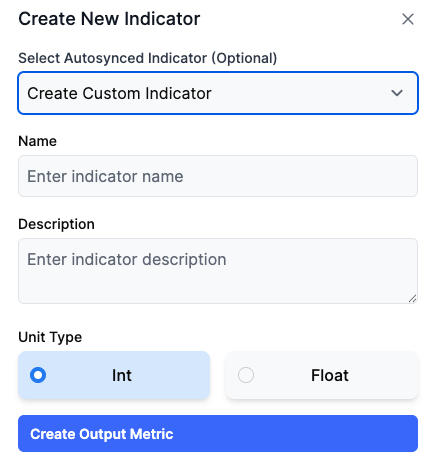
5. Assign i**ndicators** from the dropdown by using the toggle**.**
6. If an indicator is not found, you can Add new custom indicator
7. Save the Activity
8. Repeat the same to add more activities or outcomes
**Using Predefined Indicators**
If you select a **predefined indicator**, Karma will automatically pull the data.
Examples:
* GitHub Commits, PRs merged
* Onchain Txns
**What grantees must do**
* Link their GitHub repositories
* Link relevant smart contracts
Karma handles the data collection once links are provided.
**Using Custom Indicators**
If no predefined indicator fits your needs, you can create a **custom indicator**.
Examples:
* Number of workshops conducted
* Partnerships formed
* Users onboarded offchain
**How it works**
* Grantees manually input values
* Data is submitted as part of project updates or milestone completion
This gives you flexibility without losing structure.
#### Step 3: View Impact at the Community Level
Once impact measurement is configured and grantees begin reporting, you can view aggregated impact data.
**How to do this**
1. Go to **Community Page**
2. Open the **Impact** tab
Here you can see:
* Activity metrics across projects
* Outcomes generated by the program
* Indicator values over time
***
### How Grantees Report Impact
When grantees:
* Post project updates
* Complete milestones
They are prompted to:
1. Select relevant **Indicators**
2. Enter or confirm indicator values
3. Submit supporting context where required
This ensures impact data is:
* Collected continuously
* Tied to real project activity
* Comparable across projects and rounds
***
### Best Practices for Program Operators
* **Keep indicators simple**: Fewer, high-signal metrics are better than many vague ones
* **Separate outputs and outcomes clearly**: Avoid mixing activity with impact
* **Reuse categories across programs/rounds**: This enables longitudinal analysis
* **Default to predefined indicators where possible**: They reduce reporting burden and improve data quality
### Summary
Karma’s impact measurement system allows you to:
* Structure impact using industry-standard concepts
* Automatically track onchain and offchain activity
* Collect comparable, auditable data from grantees
* Generate clear impact narratives for funders and stakeholders
Impact measurement is not just reporting — it’s how programs learn, improve, and earn trust.